PRO (WA): Sales - Vera: Asking About Clients, Orders and Products
 Updated
Vera: Asking About Clients, Orders and Products
Vera can answer everyday sales questions about your accounts, orders, and products. Each answer matches what you would see on the related Cultivera PRO screen. The examples below show the kinds of questions you can ask; you do not need to use the exact words.
If you are new to Vera, start with PRO (WA): Sales - Vera: Getting Started with Your Sales Assistant.
Accounts That Are Due to Reorder
Ask: "Who is due to reorder?" or select it from Vera's suggested questions.
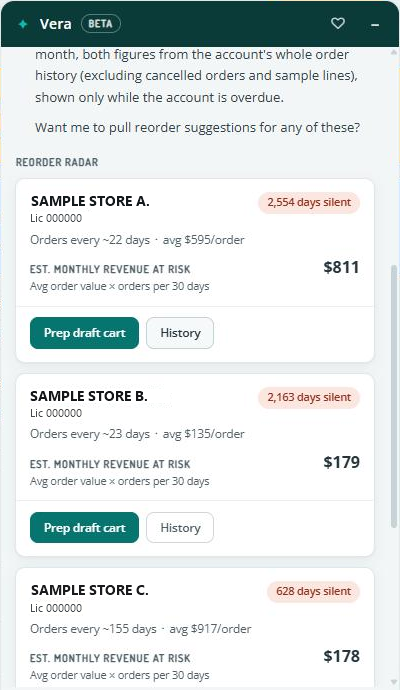
Vera lists your accounts that have gone longer than usual without ordering, with the most valuable and most urgent first. The cards appear under a REORDER RADAR heading. If there are more accounts, select 'Show more' to see them. Each account card shows:
- How many days the account has been silent, in a tag at the top of the card.
- About how often they usually order.
- Their average order value, after discounts.
- Est. Monthly Revenue at Risk: the account's average order value multiplied by the number of orders its usual ordering rhythm would produce in a 30-day month. Both figures use the account's whole order history, not counting cancelled orders and sample lines. It is shown only while the account is overdue.
Use the 'History' button on a card to see what that account usually buys, or 'Prep draft cart' to start a draft cart for it.
What to Pitch an Account
Ask: "What should I pitch Green Leaf?"
Vera suggests products the account has bought before that are in stock now, priced with the discounts that account normally gets. Products they used to buy that have recently come back into stock are highlighted.
Client Details
Ask about | Example | What Vera shows |
Client profile | "Tell me about this client." | License number, tier, sales rep, special instructions, and last order. |
Client performance | "How is this account doing?" | Month-to-date, year-to-date, and all-time revenue, as on the client overview, plus revenue at risk. |
Purchase history | "What does this client usually buy?" | The products the client has bought, and how many orders that is based on. |
Contacts | "Who are the contacts here?" | Each contact's name, title, email and phone numbers, as in the client's Contacts section. |
Orders and Carts
Ask about | Example | What Vera shows |
Order status | "Where is order 1068515?" | Where the order is, its delivery date, whether it is invoiced, and its totals as labelled on the order page. |
A client's orders | "What did they order last?" or "Show their open orders." | The client's last order and open orders. |
Last order compared to the cart | "What changed since their last order?" | The differences between the cart and the client's last order. |
Backorders | "Which of my clients have backorders?" | Backordered items for your clients. |
Open carts and portal orders | "What carts are waiting on me?" | Your open carts and portal orders, as on the Open Carts page. |
A cart's lines | "What's on this cart?" | Each line's quantity, unit price, discount and total, and whether it is a sample, a backorder, or has no price. |
Products and Pricing
Ask about | Example | What Vera shows |
Price check | "What does this account pay for Blue Dream 3.5g?" | The price this account pays and any promotion that applies, as in Build Cart. |
Availability | "How much Gelato pre-roll do we have?" | Units for sale, as in Build Cart, with lots and potency. Availability covers all locations. |
Accounts that have never bought a product | "Which of my accounts have never bought our vapes?" | Your accounts that have not bought that product or product line. |
Products a client has never bought | "What has this client never bought?" | Products for sale that the client has not ordered before. |
Your Performance
Ask: "How am I doing this month?"
Vera compares this month with last month, using the Sales Person Report. Cancelled orders are not counted.
