Cultivera Pro (WA) Patch - 6.0.35 Release Notes (8/25/2026)
 Updated
Updates To Cultivera Pro (WA) - 8/25/26
Please see below for a summary of the updates made in Cultivera Pro (WA) in our most recent release on August 25, 2026:
Modernized grids:
User-friendly grids have been implemented across the entire platform.
Grow Module Redesign:
- Grow Dashboard - redesigned user-friendly grid; no functionality change
- Grow Cycles - redesigned user-friendly grid; no functionality change
- Plants - redesigned user-friendly grid; no functionality change
- Harvest - redesigned user-friendly grid
- Existing Harvest Details added to main "Harvests" page:
- Plants Ready to Harvest
- Awaiting Wet Weight
- Drying
- Ready to Finish
- New Columns on Grow > Harvest:
- Status
- Next Step
- Harvest Details page updates:
- Redesigned user-friendly details displayed
- Harvest Status
- Harvest Type (Standard vs Manicure)
- Manicure harvests — the plants stayed active in the grow
- Status stepper implemented (Harvested → Wet Weight → Cure → Finish)
- Harvest Outputs detail (color-coordinated)
- Redesigned user-friendly details displayed
- Existing Harvest Details added to main "Harvests" page:
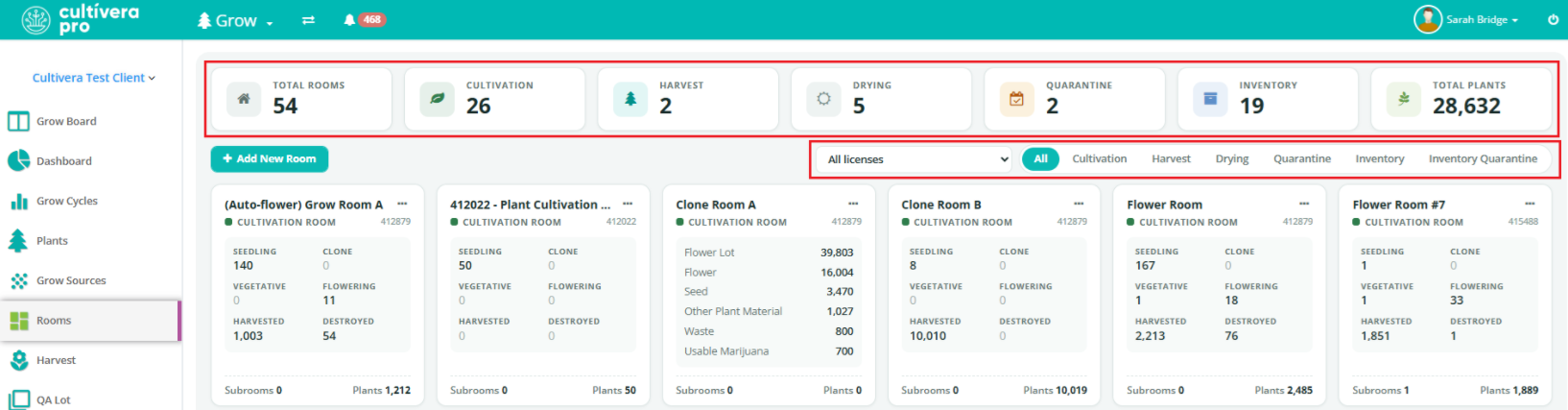
Grow/Inventory Management > Rooms Updates:
- Redesigned user-friendly grid
- New filters implemented on this page:
- Filter by License
- Filter by Room Type
- Updated Room Count tiles at the top of the page
- No functionality change to the "Add New Room" workflow
Inventory Management > Production - Bill of Materials and Production Run Updates:
- New Production tab headers: "Setup - Bill of Material" / "Runs - Active & History"
- Redesigned user-friendly grid
- Guided bill-of-materials creation and self-explanatory production run screens
- Inventory-type visibility throughout the production run flow
For more information about these updates, please refer to the "PRO: Inventory Management - Creating a Bill of Materials and Completing a Production Run" self-help guide.
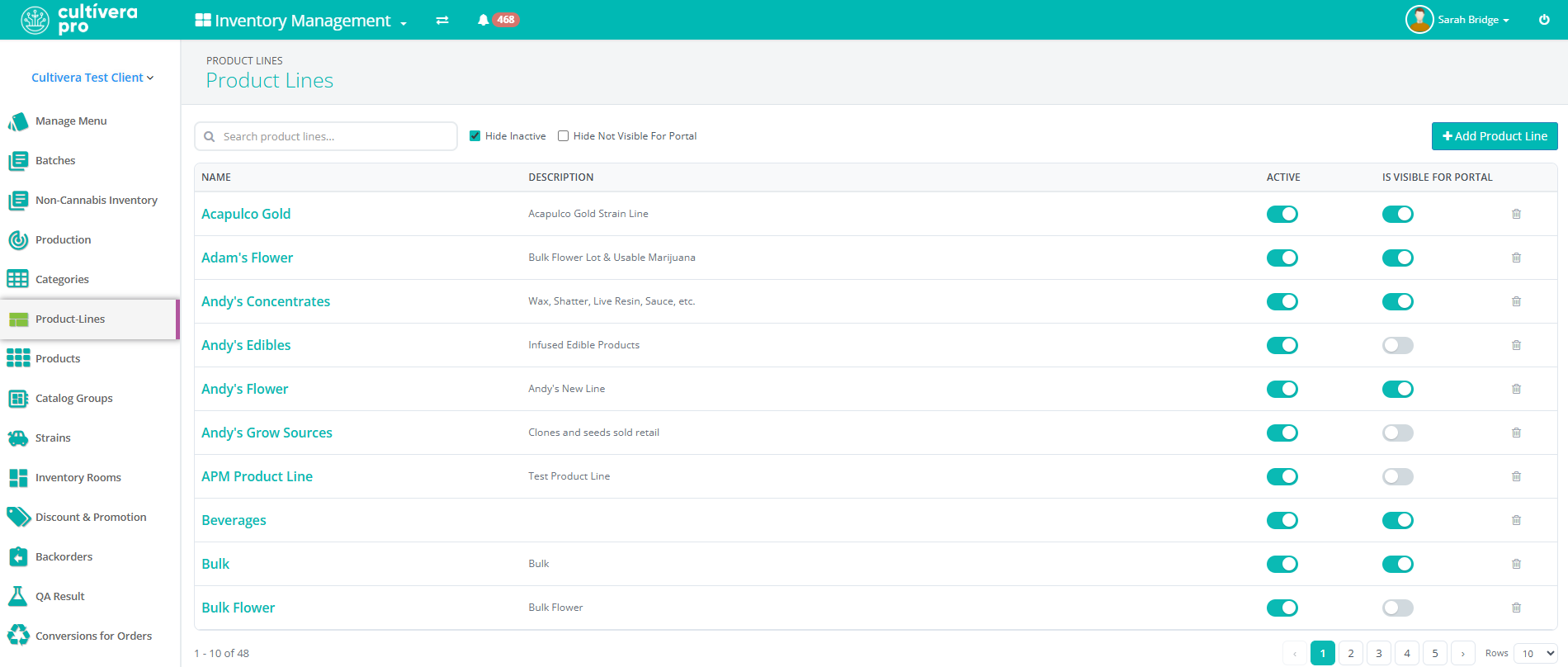
Inventory Management > Product Lines Redesign:
- Product Lines - this page has been redesigned with a user-friendly grid. Functionality remains the same.
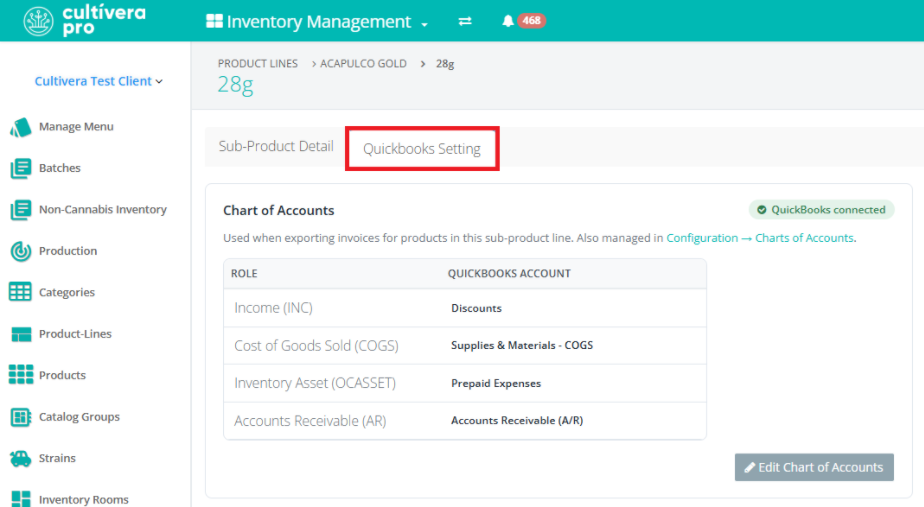
- Sub-Product Lines - this page has been redesigned with a user-friendly grid, and a new "QuickBooks Settings" tab has been implemented.
- Functionality remains the same on the main "Sub-Product Detail" page.
- The new "QuickBooks Settings" tab allows users to easily view the Charts of Accounts assigned to the Sub-Product Line. There is a 'Configuration > Charts of Accounts' link on this page that will redirect users to the Chart of Accounts setup page under the Configuration module.
- There is also an "Edit Charts of Accounts" link that allows users to remap/assign QBO Charts of Accounts directly from this tab.
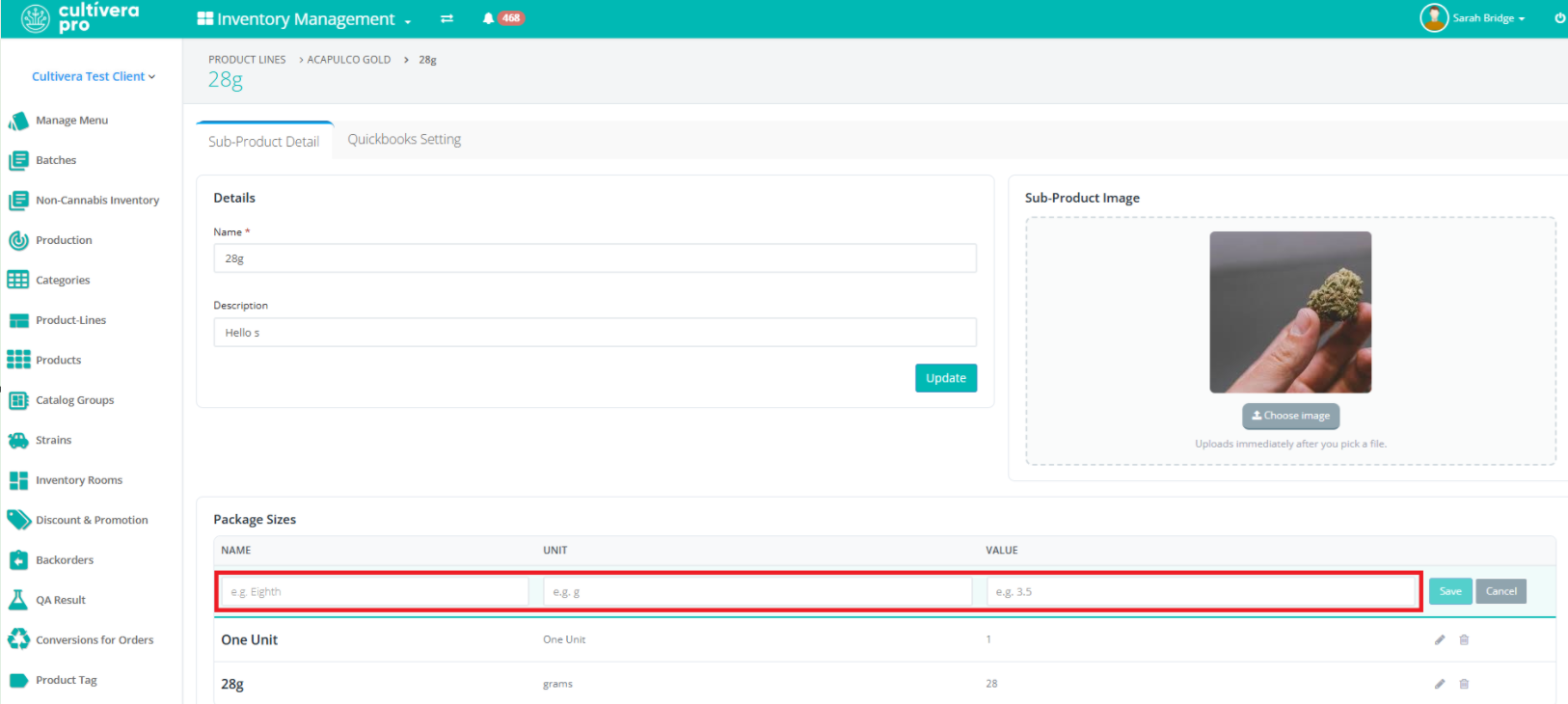
- Package Sizes - this page has been redesigned with a user-friendly grid, and examples of Package Size Name, Unit, and Value are now visible when selecting "Add Package Size".
QuickBooks Online Updates:
- New QBO Configuration Feature in Product Details (for manual QBO product mappings).
- This new feature will allow users to manually assign QBO products to a given product (if the QBO and Cultivera PRO product names do not match).
- You can refer to the following self-help guide for more information about this new feature: PRO: QuickBooks Online Manual Product Mapping.
- Configuration > Charts of Accounts Redesign.
- This page has been redesigned with a user-friendly grid and a per-line editor covering both single and multi sub-product lines.
- You can refer to the following self-help guide for more information about the redesigned Charts of Accounts page: PRO: QuickBooks Online Chart of Accounts Redesign (Released 8/25/2026).
Configuration > Audit Updates:
- "Email PO" / "Email Invoice" actions added to Configuration > Audit and Order Details "System Notes".
- The Configuration > Audit log and Order Details > "System Notes" now include the date/timestamp and the user who sent out those specific emails to a client via Cultivera PRO.
- "Failed Login" Attempts added to Configuration > Audit.
- The Audit log now captures when a user attempts to sign in with the wrong login credentials and locks the user account due to "Too Many Failed Login Attempts".
- "User Locked" / "User Updated" added to Configuration > Audit.
- The Audit log now captures when a user profile is locked or updated.
